
Joi - Live Video Chat
VLMedia A.Ş.Social
4.44.70K Reviews
- Version
- 2.7.0.2
- Installs
- 10.00M
- Age Rating
- Mature 17+
Screenshots


Our Review of Joi - Live Video Chat
 Analysis by Appyee
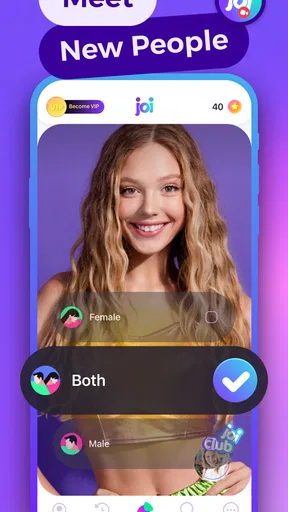
I approached Joi - Live Video Chat as a social app for people who prefer meeting someone through a live camera conversation rather than starting with a long text exchange. My first impression was that its appeal is very immediate: open the app, enter the social flow, and see where a random video call leads. That can be refreshing when ordinary messaging feels slow, but it also means the experience depends heavily on your comfort with strangers and your willingness to leave a conversation quickly when it feels wrong.
Joi is free to download and use as a social app, although it includes optional purchases ranging from $0.50 to $189.99 per item. It comes from VLMedia A.Ş., carries a Mature 17+ rating, and supports devices running Android 6.0 or later. The current version is 2.7.0.2, so anyone deciding whether to try it should think of it as an actively maintained product rather than an abandoned experiment. I would still treat the age rating seriously: this is a stranger-video environment, not a casual family chat tool.
How Joi feels in everyday use
The central idea is simple: meet strangers online through live video chat and random video calls. In practice, that simplicity is both the strongest part of the app and the source of most of its tension. You do not need to build a large profile, write a clever opening message, or wait for a mutual match before finding out whether a conversation has any energy. The camera makes the interaction more direct, and sometimes a short, spontaneous call is exactly what you want.
I can imagine using it after work when I wanted a brief change of pace rather than another carefully managed conversation. A few minutes of live interaction can feel more human than scrolling through profiles. It may also suit someone who is practicing casual conversation, looking for international social contact, or simply curious about the unpredictability of random calls. The important distinction is that Joi is built around immediate encounters, not around slowly developing a dependable circle of friends.
That difference matters when comparing it with familiar alternatives. Traditional messaging platforms give you more control over when you reply and what you reveal. Dating apps usually offer profiles, matching, and a chance to screen someone before speaking. Group communities provide a shared topic that can make the first conversation easier. Joi removes much of that preparation. If you enjoy spontaneity, this feels liberating; if you need context and predictability, it can feel abrupt.
The best way to approach a random call
My practical advice is to treat every call as a short trial, not as the beginning of a relationship. Keep your first conversations light, avoid sharing personal contact details, and end the call as soon as the other person becomes aggressive, sexual, manipulative, or simply makes you uncomfortable. You do not owe a stranger an explanation for leaving. This mindset makes the app easier to enjoy because you are not trying to rescue every awkward interaction.
A useful habit is to decide your boundaries before opening the camera. For example, I would avoid showing documents, workplace screens, house numbers, school uniforms, or anything visible through a window that reveals where I am. A live video call can disclose more than a profile photo, including your surroundings and your routine. Even if a conversation feels friendly, I would keep the first sessions deliberately limited.
Another non-obvious trade-off is that camera-based socializing rewards confidence but can punish hesitation. On a text service, you can edit a sentence or pause before responding. In a live call, silence and body language arrive immediately. That makes Joi useful for people who want to become more comfortable speaking spontaneously, but it may be tiring for users who prefer thoughtful, asynchronous communication.
Who is likely to enjoy it
Joi is a good fit for adults who want fast, low-commitment social contact and understand that random video calls are inherently uneven. It is especially suitable if you enjoy meeting people without planning every detail, can handle a conversation that ends quickly, and are comfortable deciding for yourself when to continue or leave.
It can also work for someone who has become bored with endless profile browsing. Instead of spending a long time judging photos and short descriptions, you get a more immediate sense of another person’s communication style. That does not make the interaction safer or more meaningful by itself, but it does change the kind of decision you are making: less “Should I match?” and more “Do I want to spend another minute here?”
I would not recommend it to a minor, despite the easy-to-understand interface implied by its simple concept. The Mature 17+ rating is an important boundary, and parents should not treat the app as a harmless video game or ordinary family messenger. I would also suggest skipping it if you are currently looking for a moderated professional network, a focused support community, or a reliable way to maintain contact with people you already know.
What the current version means for users
The presence of version 2.7.0.2 gives existing users a clear reference point when checking whether they are running the current build. In an app centered on live communication, staying updated is more than a cosmetic preference: compatibility, call behavior, and general stability can all depend on using the same recent version as other participants. I would check the app’s update status before troubleshooting a problem that might simply come from an older installation.
The app was released on February 24, 2020, which gives it a longer history than a newly launched social experiment. Its current reach is also substantial, with over 10 million installs, while its average rating stands at 4.4 from around 92 thousand ratings. Those figures suggest that the concept has found a broad audience, but they should not be read as a promise that every call will be enjoyable. Random social products naturally produce very different experiences from one person to the next.
For someone who has used Joi for a while, the practical effect of a current build is less about learning an entirely new product and more about keeping the core experience dependable. I would update before deciding that the service has become unreliable, then test it across several separate sessions rather than judging it from one unlucky run of calls. A single awkward encounter says more about randomness than about the whole app.
Where the cost can become confusing
The free entry point is helpful because it lets you understand the basic social rhythm before spending anything. However, the optional purchase range is wide, reaching from $0.50 to $189.99 per item. That makes it important to slow down around any purchase screen and understand exactly what you are selecting before confirming it. I would never buy something merely because a conversation is going well or because I feel pressured to keep access moving.
This is one area where Joi differs from a completely free messaging app. A normal messenger may still have other concerns, but its core purpose is usually to contact people you already know without a random-call economy. With Joi, the free starting point is attractive, yet the presence of in-app purchases means the app deserves the same spending discipline as any other social service. Set a personal limit before experimenting, and do not assume that paying will create better chemistry with strangers.
A second useful test is to use the free experience long enough to decide whether the format itself suits you. If you dislike unexpected video conversations, purchases will not solve that fundamental mismatch. Spending more is only sensible when the basic interaction already feels comfortable and worthwhile to you.
Safety, privacy, and emotional energy
Random video chat requires more active self-protection than a text-only social app. I would use a neutral background, keep identifying objects out of frame, and avoid discussing my exact location, daily schedule, financial situation, or private relationships. These are not dramatic precautions; they are simple ways to reduce the amount of information a stranger can collect during a short call.
There is also an emotional side that is easy to overlook. A stream of disconnected conversations can be entertaining, but it can also become draining if you are hoping every call will feel meaningful. I found it more sensible to use Joi in short sessions with a clear reason for opening it. If the calls start feeling repetitive, hostile, or performative, closing the app is a better choice than forcing yourself to continue.
Before using any social video service, I would also familiarize myself with the available controls for leaving or reporting an interaction and keep the app’s age boundary in mind. I would not rely on another person’s friendly tone as proof that they are trustworthy. The camera can create a false sense of familiarity very quickly, especially when the conversation is personal or emotionally intense.
Limitations that affect the decision
The biggest limitation is built into the random-call format: you cannot control the quality, attitude, or availability of the person on the other side. Even a well-designed interface cannot guarantee balanced conversations. Some calls may end instantly, some may be silent, and others may feel incompatible from the first few seconds. Users who want consistent results may find this frustrating.
Video also demands more from you than text. You need a suitable place, enough privacy, and the willingness to appear on camera. That makes Joi less convenient on public transport, at work, or in a shared home. A text messenger is usually the better alternative when you need discretion, when your connection is unstable, or when you want to answer at your own pace.
The app is not the right choice for building a carefully organized community around a shared hobby either. A group-based platform can give you a topic, recurring participants, and a stronger sense of continuity. Joi is more about the encounter itself. That can be exciting, but it leaves more of the conversational work and safety judgment to the individual user.
Small habits that improve the experience
I would begin with a short session rather than leaving the app open indefinitely. This prevents the random format from turning into passive scrolling and makes it easier to notice whether I am actually enjoying the conversations. If several interactions feel poor, I would take a break instead of assuming that buying something will improve the outcome.
I would also prepare a few neutral opening subjects before starting. Questions about hobbies, films, music, travel, or daily routines are easier to use than searching for a perfect introduction under pressure. The goal is not to interrogate the other person; it is simply to avoid making the first silence feel like a failure.
One more advanced habit is separating curiosity from trust. A person can be interesting without becoming someone I should add elsewhere or meet in person. Keeping those decisions separate protects the enjoyable part of Joi—the spontaneous conversation—without allowing a pleasant few minutes to override sensible boundaries.
What I would watch as the app evolves
Because the current version is 2.7.0.2, I would pay attention to how future updates affect the balance between immediacy and control. The most valuable improvements for this kind of app would be changes that help users manage unwanted interactions, understand spending clearly, and move through calls without unnecessary friction. Those areas matter more to me than decorative changes because they shape whether the service feels comfortable over repeated use.
I would also watch whether the app remains welcoming to first-time users without hiding the Mature 17+ nature of the experience. A clear understanding of the audience is essential when live video and random contact are combined. Existing users should look for update notes and changes in the way calls, purchases, or account controls behave, while new users should judge the product on their own comfort rather than on its popularity alone.
Its broad install base and strong average rating show that many people find value in this style of social contact, but they do not remove the personal trade-offs. Joi works best when I use it as a controlled experiment in conversation: open to surprises, careful with information, and ready to leave. That is a different promise from a conventional messenger or a structured dating app, and the distinction is important.
My final view is positive but selective. I like the directness of Joi - Live Video Chat, the fact that I can try the format without an upfront price, and the possibility of having a genuinely unexpected conversation. At the same time, I would recommend it only to mature users who are comfortable with uncertainty, understand the purchase range, and are willing to manage their own boundaries. If you want spontaneous live contact with strangers, it is worth trying carefully. If you want predictable relationships, quiet messaging, or a tightly organized community, another kind of social app will serve you better.
Privacy and Permissions
See what permissions an app requests and how it handles your data.
- Photos/Media/Files
- read the contents of your USB storage, modify or delete the contents of your USB storage
- Storage
- read the contents of your USB storage, modify or delete the contents of your USB storage
- Camera
- take pictures and videos
- Microphone
- record audio
- Wi-Fi connection information
- view Wi-Fi connections
- Other
- view network connections, pair with Bluetooth devices, full network access, change your audio settings, prevent device from sleeping
Verdict
Strengths of Joi - Live Video Chat
- Quickly connect with people through live video chats.
- Simple interface makes starting conversations easy.
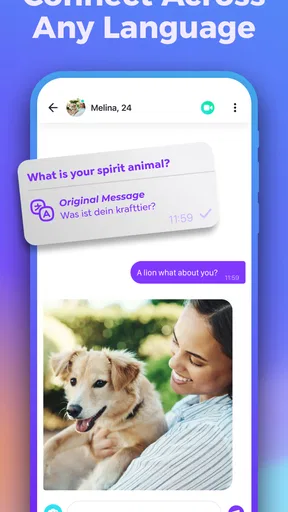
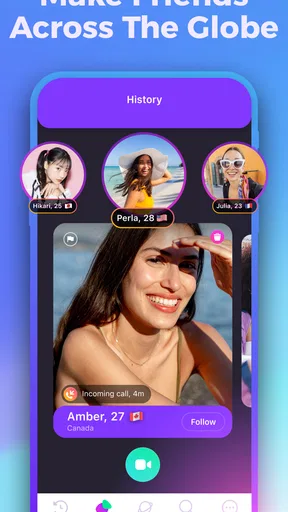
- Supports spontaneous interactions with users worldwide.
- Video format feels more personal than text-only messaging.
- Useful for meeting new people from different backgrounds.
Limitations of Joi - Live Video Chat
- Some features may require in-app purchases or paid credits.
- User experience can depend heavily on connection quality.
- Public video interactions may raise privacy concerns.
- You may encounter inactive, unsuitable, or unresponsive users.
- The app can consume significant battery and mobile data.
Other Releases by VLMedia A.Ş.
View All
Gaze - Live Random Video Chat
Lifestyle4.5
Similar Picks in This Category
View All
Meta Platforms, Inc.4.6

Instagram4.0

Likee-Live, Chat & Party Games
Likeme Pte. Ltd.4.4

Facebook Lite
Meta Platforms, Inc.4.5

TikTok - Videos, Shop & LIVE
TikTok Pte. Ltd.4.0

Moj: Free Short Drama & Reels
ShareChat4.1
Frequently Asked Questions
What is Joi - Live Video Chat, and how does it work?
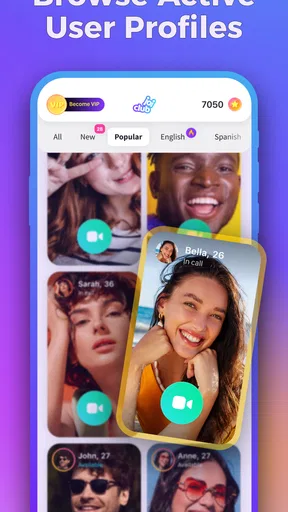
Joi - Live Video Chat is a social communication app designed for meeting and talking with people through live video interactions. After creating an account, you can browse available profiles or live users, start conversations, and use video or messaging features depending on the other person’s availability. The experience is focused on spontaneous social connections rather than traditional text-only communication.
Is Joi - Live Video Chat free to download and use?
The app can generally be downloaded at no initial cost, but some features may require in-app purchases, virtual coins, subscriptions, or other paid options. Video calls, gifts, extended conversations, or profile-related functions may not all be included in the free experience. Before spending money, check the current pricing, payment terms, and renewal details shown in the app store or inside Joi.
Is Joi - Live Video Chat safe for meeting strangers online?
As with any live video chat platform, users should be cautious because conversations involve people they may not know personally. Avoid sharing your home address, financial information, passwords, private documents, or other sensitive details. Use the app’s blocking and reporting tools whenever someone behaves abusively or suspiciously, and remember that profile information and intentions cannot always be verified.
Does Joi require access to my camera, microphone, or location?
To provide live video and voice conversations, Joi may request permission to use your device’s camera and microphone. You can deny these permissions, although doing so may prevent video-chat features from working correctly. Location access may also be requested for social discovery or personalization, depending on the version and your settings. Review each permission carefully and disable anything unnecessary.
Can I control who contacts me and delete my Joi account?
Joi typically provides tools such as blocking, reporting, muting, or ending a conversation so you can manage unwanted interactions. However, the exact controls may vary by app version, account type, and region. If you decide to stop using the service, look in the profile, settings, or account-management section for deletion instructions, and review the privacy policy to understand how your data is handled.
